
Learn how NFC cards and QR sharing make professional networking faster, cleaner, and more memorable. This category explains contactless profile sharing, smart business cards, QR access, and modern ways to connect without paper.

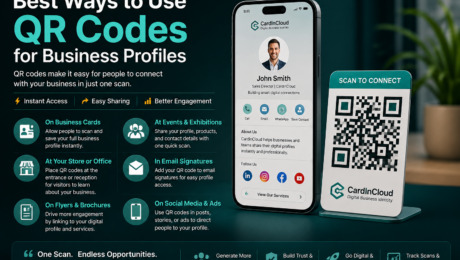
A business profile should not sit hidden inside a website menu, a printed brochure, or a forgotten email signature. With one QR code, a customer, visitor, investor, or partner can open your company profile in seconds and take action immediately.
That is why the best ways to use QR codes for business profiles are not only about sharing a link. They are about turning every physical touchpoint into a live digital entry point for your brand.
A QR Code Turns Your Business Profile Into a Real-World Gateway
A QR code gives your business profile a physical presence. It connects your offline world — offices, shops, counters, packages, uniforms, brochures, events, and printed materials — with your online identity.
Instead of asking people to search your company name, type a website address, or save contact details manually, you give them one simple action: scan and open.
This matters because people act faster when the path is short. A business profile connected to a QR code can show your company information, contact buttons, location, social media, services, portfolio, videos, reviews, team profiles, and direct communication options in one clean place.
For CardInCloud, this is exactly where QR codes become powerful. A company can create a professional digital business profile, connect it to a dynamic QR code, and place that QR anywhere customers already interact with the business.
Use QR Codes at Reception and Front Desk Areas
The reception desk is one of the most valuable places to use a QR code for a business profile. Visitors are already waiting, looking around, and trying to understand who you are.
A small acrylic stand, wall sign, or desk display with a QR code can guide them to your business profile instantly.
This can work well for:
- Clinics and medical centers
- Hotels and hospitality businesses
- Real estate offices
- Consulting companies
- Training centers
- Showrooms
- Government service desks
- Corporate offices
When visitors scan the QR code, they should not land on a messy page. They should see a polished business profile with clear actions: call, WhatsApp, location, services, team, reviews, and social links.
CardInCloud helps businesses make this experience feel premium. The QR code is not just a technical tool. It becomes part of the company’s first impression.
Put QR Codes on Business Cards, NFC Cards, and Employee Profiles
Paper business cards are easy to lose and hard to update. A QR code on a business card solves part of that problem, but combining QR with NFC makes the experience stronger.
An employee can share their digital profile in two ways: tap the NFC card or let the person scan the QR code. This gives flexibility because not every situation is the same. Some people prefer tapping, while others prefer scanning.
For teams, this is more important. A company can issue CardInCloud profiles for employees, connect each profile to an NFC card and QR code, and manage those profiles from one dashboard.
This creates a cleaner identity system for the whole team. If an employee changes job title, phone number, department, or social link, the profile can be updated without printing new cards.
That is a real business advantage: less waste, faster updates, and stronger control over company identity.
Add QR Codes to Email Signatures and Digital Documents
A QR code is not only for printed materials. It can also be useful inside digital documents, proposals, PDFs, catalogs, invoices, presentations, and email signatures.
This gives your business profile more chances to be opened.
For example, a sales proposal can include a QR code that leads to the company profile or the sales representative’s profile. A PDF catalog can include a QR code that opens the latest service page or contact options. An invoice can include a QR code that leads to support, payment information, or business details.
This is a simple SEO and brand visibility advantage. The more often your business profile is opened, shared, and linked from different touchpoints, the more your brand gains digital signals and user engagement.
The keyword angle is clear: businesses searching for “QR codes for business profiles,” “digital business profile,” “corporate digital profile,” or “smart business card platform” are not only looking for design. They are looking for a system that helps people find, trust, and contact them faster.
Use QR Codes on Storefronts, Windows, and Walls
A storefront QR code can work even when the business is closed. Someone passing by can scan and still get your profile, opening hours, location, services, menu, booking link, WhatsApp, or social media.
This is one of the easiest ways to turn a physical location into a 24/7 digital access point.
Restaurants can show menus and reservation links. Clinics can show services and appointment contact buttons. Real estate companies can show listings and agent profiles. Training centers can show courses and registration links.
The key is to keep the profile simple. A person scanning from outside does not want to read a long corporate page. They want quick answers.
A strong QR business profile should answer these questions fast:
Who are you?
What do you offer?
Where are you located?
How can I contact you now?
Why should I trust you?
CardInCloud profiles are useful here because they can organize this information in a mobile-friendly way. The QR scan should feel instant, clean, and professional.
Use QR Codes in Events, Exhibitions, and Networking
Events move fast. People meet many companies, collect many brochures, and forget most of them.
A QR code helps your business profile stay alive after the conversation ends.
Instead of handing out only printed material, your team can place QR codes on booth displays, roll-up banners, badges, staff cards, brochures, and demo screens. Visitors can scan the profile and save your company details instantly.
This also creates a strong social media angle. A clean QR profile is highly shareable because it reduces friction. People can send the profile link on WhatsApp, LinkedIn, or email after the event.
The most shareable line here is simple:
A QR code does not replace the human conversation. It makes the conversation easier to remember.
That is why QR codes are especially powerful for sales teams, founders, consultants, recruiters, and business development teams.
Connect QR Codes to Google Reviews and Social Proof
For many businesses, trust is the biggest barrier. People may like your service, but they still want proof.
A business profile can use QR codes to guide people toward Google Reviews, testimonials, social media pages, certifications, case studies, or portfolio work.
This is very useful for service businesses. A customer who scans your profile should quickly see why your business is credible.
CardInCloud can support this by placing review links, social links, videos, certificates, and business information inside one professional profile. Instead of sending people to five different places, the QR code brings them to one organized profile that points them in the right direction.
This is not only about looking modern. It is about reducing doubt.
Use Dynamic QR Codes Instead of Static QR Codes
One of the biggest mistakes businesses make is printing static QR codes that cannot be changed later.
A static QR code points to one fixed link. If the link changes, the printed QR code becomes useless. A dynamic QR code is much better because the destination can be managed and updated without reprinting the code.
For business profiles, this is critical.
Companies change phone numbers, team members, offers, services, branches, campaigns, and landing pages. A dynamic QR system gives them control.
CardInCloud is built around this idea. The profile can stay live and updated, while the QR code remains the same. This protects your printed materials, NFC cards, signs, and displays from becoming outdated.
For decision-makers, this is the business angle: QR codes are not a small design element. They are part of identity management, customer access, and operational efficiency.
What Is the Best Way to Use QR Codes for a Business Profile?
The best way to use QR codes for a business profile is to connect one professional, mobile-friendly, updateable profile to every important customer touchpoint.
That means the QR code should not lead to a random page. It should lead to a profile that is clear, fast, branded, and action-focused.
A strong business profile should include:
- Company name and logo
- Short business description
- Contact buttons
- WhatsApp or direct message link
- Location and working hours
- Services or products
- Social media links
- Team or employee profiles
- Reviews or trust signals
- Save-contact option
- Analytics and scan tracking when available
This is where CardInCloud gives businesses more than a QR code. It gives them a structured digital business identity that can be shared, updated, managed, and measured.
Track Scans and Learn What People Actually Do
A QR code becomes more valuable when you know how people use it.
Businesses should track scans, visits, clicks, profile views, and interactions where possible. This helps teams understand which touchpoints are working.
For example, a restaurant may discover that QR codes on tables get more scans than posters. A clinic may find that reception desk scans lead to more WhatsApp messages. A sales team may learn which employee profiles get the most engagement after events.
This turns QR codes from a passive tool into a business signal.
Analytics help answer real questions:
- Where are people scanning?
- Which profile gets the most visits?
- Which contact button gets the most clicks?
- Which campaign or location performs better?
- Are customers only viewing, or are they taking action?
For founders, managers, and marketing teams, this is where QR codes become strategic. They can guide better decisions, not just decorate printed materials.
Keep the Design Clean and the Call to Action Clear
A QR code needs a reason to be scanned. Placing a code without context is weak.
Do not write only “Scan me.” Make the benefit clear.
Better examples:
- Scan to view our company profile
- Scan to contact our team
- Scan to save our business details
- Scan to see our services
- Scan to connect with our sales team
- Scan to open our digital profile
The design should be clean, branded, and easy to scan. Avoid placing QR codes on busy backgrounds. Keep enough space around the code. Make sure it is large enough for the scanning distance.
This small detail can change the result. A QR code that looks professional builds trust before the scan even happens.
The Action Businesses Should Take Today
Start with one business profile and one high-value QR placement.
Do not overcomplicate the first step. Create a strong digital business profile, connect it to a dynamic QR code, and place it somewhere customers already look: reception, front desk, business card, storefront, proposal, or event stand.
Then measure what happens.
If people scan, improve the profile. If they do not scan, improve the placement, wording, or design. The goal is not only to use QR codes. The goal is to make your business easier to discover, contact, trust, and remember.
CardInCloud makes this practical for companies because it combines business profiles, employee profiles, NFC sharing, QR access, analytics, and profile management in one platform.
A QR code is small, but when it opens the right business profile, it can carry the full weight of your brand. The businesses that understand this will not treat QR codes as decoration. They will use them as smart doors into their digital identity.
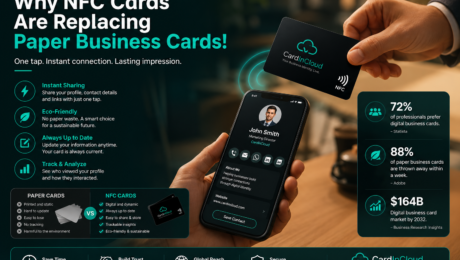
Paper business cards still exist, but they no longer match the speed of modern business. People move fast, teams change details often, and nobody wants to lose a contact because a card was misplaced, damaged, or forgotten in a pocket. That is exactly why NFC cards are replacing paper business cards.
An NFC card turns a short introduction into an instant digital experience. One tap can open a professional profile, save contact details, show social links, display a company page, and guide the other person to the next step without friction. It feels faster because it is faster. It feels smarter because it removes the small delays that usually break momentum in networking.
Paper Cards Still Look Familiar, But They Create Friction
The problem with paper cards is not that they are traditional. The problem is that they are static.
Once printed, the information is frozen. If your phone number changes, your title changes, your company address changes, or your social links change, the card becomes outdated. That creates waste, extra printing cost, and missed opportunities.
Paper cards also depend too much on the receiver. They have to keep the card, read it later, type the details manually, and decide what to do next. Every extra step reduces the chance of a real follow-up.
NFC cards remove that friction. Instead of handing over information and hoping it gets used, you guide the person directly into your digital identity.
What Makes NFC Cards Different?
NFC stands for near-field communication. In simple terms, it allows one device to send information to another with a tap. For business use, that means a person can tap your card with their phone and instantly open your profile, company page, team page, or contact details.
That one small action changes the whole experience.
Instead of giving someone a piece of paper, you give them a live profile. Instead of a printed name and number, you can share a richer identity that includes:
- Name and role
- Company and department
- Phone and email
- Website and location
- Social media links
- Portfolio or service pages
- WhatsApp connection
- Team or company profile
This is one of the biggest reasons NFC cards are replacing paper business cards. People no longer want a dead-end card. They want a direct path.
Why Businesses Are Moving Faster Than Individuals
For a single person, switching from paper to NFC already makes sense. For teams and companies, the value is much bigger.
A business does not just need a contact card. It needs consistency, control, and speed. When employees use paper cards, every update means reprinting. Every design mismatch weakens brand image. Every lost card is a missed opportunity.
With NFC-based digital profiles, businesses can create a more controlled and professional system. Employee identities can follow one brand standard. Contact information can stay updated. Profiles can point customers to the right channels. Management can create a more polished public presence without depending on old printed methods.
This is where platforms like CardInCloud become especially important. CardInCloud does not treat the card as just a card. It treats it as a digital business identity layer.
A CardInCloud NFC card can open a live professional profile instead of showing only raw contact data. That means companies can present their employees, departments, branches, and business details in a smarter way. The result is not only easier sharing. It is stronger branding, cleaner communication, and better business continuity.
Are NFC Business Cards Better Than Paper Business Cards?
Yes, in most modern business situations, they are.
They are better when you need fast sharing. Better when your details change. Better when you want people to save your contact instantly. Better when you want to look current, organized, and digital-first.
Paper cards still have a place in some traditional settings, especially where people prefer printed materials. But even there, paper often works best as a backup, not the main tool.
The real advantage of NFC is not novelty. It is usability.
People already understand tap actions because they use them for payments, access, and daily phone interactions. That makes NFC networking feel natural. It fits how people already behave.
The Branding Advantage Most Companies Ignore
There is also a branding shift happening here.
A paper card says, “Here is my information.”
An NFC profile says, “Here is my professional presence.”
That difference matters. When someone taps a card and opens a clean branded profile with a company logo, role, links, and a clear call to action, the impression is stronger. It feels more premium. It also makes the business look more serious about digital transformation.
This is where the article keyword matters from an SEO point of view too: people searching “Why NFC Cards Are Replacing Paper Business Cards” are usually not just comparing formats. They are looking for a better business identity system. That is why the winning solution is not only an NFC chip. It is the full experience behind it.
From a social media angle, this topic is naturally shareable because the contrast is easy to understand: static paper vs live digital profile. That makes it highly quotable for posts, short videos, and business education content.
The Real Business Decision
The question is no longer whether NFC cards look modern. They do.
The real question is whether your business still wants to depend on a tool that cannot update itself, cannot measure engagement, cannot guide users anywhere, and cannot reflect the speed of modern communication.
That is why NFC cards are replacing paper business cards. They save time, reduce waste, improve follow-up, and help companies present a sharper professional image. More importantly, they turn a simple introduction into a digital connection that can actually continue after the first meeting.
Businesses that adopt this early do not just look advanced. They become easier to reach, easier to trust, and easier to remember.
And that is the point. In modern networking, the best card is no longer the one people keep in their wallet. It is the one that keeps working after the conversation ends.
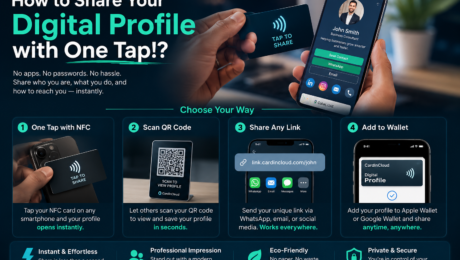
One tap can say more than a paper card ever could. Instead of handing someone a card they may lose, you can let them open your full digital profile instantly — contact details, social links, company information, portfolio, location, and more — from their phone.
That is the real power behind a modern digital profile: it turns the first meeting into a direct connection.
The Simple Idea: Tap, Open, Connect
Sharing your digital profile with one tap means using an NFC card, NFC tag, or smart QR access point to open your profile on another person’s phone.
No app is needed.
No typing is needed.
No searching is needed.
The person simply taps your NFC card with their phone, and your profile opens in the browser.
This makes networking faster, cleaner, and more professional. It also removes the awkward moment of spelling your email, repeating your phone number, or hoping the other person keeps your paper card.
How One-Tap Digital Profile Sharing Works
A one-tap digital profile usually works through NFC technology.
NFC stands for Near Field Communication. It is the same contactless technology used in payments, access cards, and smart devices. When someone taps your NFC card with their smartphone, the card sends a secure web link to the phone.
That link opens your digital profile.
From there, the visitor can view your information, save your contact, open your WhatsApp, visit your website, follow your social accounts, check your company location, or explore your services.
With CardInCloud, this experience becomes smoother because the profile is built for professional use, not just basic contact sharing.
Why This Is Better Than a Paper Business Card
A paper business card is static. Once printed, it cannot change.
If your phone number changes, the card is outdated.
If your title changes, the card is outdated.
If your company adds a new service, the card says nothing about it.
A digital profile is different. You can update it anytime, and the same NFC card or QR code continues to open the latest version.
This is where one-tap sharing becomes more than a nice feature. It becomes a smarter business identity.
Instead of giving people a small piece of paper, you give them a live professional profile that can grow with you.
What Can You Share in a Digital Profile?
A strong digital profile should not be only a contact page. It should act as a compact professional presence.
With CardInCloud, a profile can include:
- Name, job title, and company role
- Phone number, email, and WhatsApp
- Website and social media links
- Google Maps location
- Company information
- Profile photo and branding
- Save-to-contact button
- QR code sharing
- NFC one-tap access
- Analytics and interaction tracking
That means every tap can become a measurable business interaction, not just a forgotten exchange.
How CardInCloud Makes One-Tap Sharing More Professional
CardInCloud is designed for individuals, teams, and businesses that want a smarter digital presence.
A sales team can share verified employee profiles during meetings.
A hotel can let guests access concierge contacts or service profiles.
A clinic can help patients reach the right department faster.
A company can give every employee a professional digital identity under one controlled system.
The value is not only in the NFC card. The value is in the managed profile behind it.
CardInCloud helps businesses control how their people appear, how their information is updated, and how customers interact with them after the first tap.
The Business Advantage: Every Tap Can Become Data
One of the biggest problems with paper cards is that you never know what happens after you hand them out.
Did the person keep it?
Did they call later?
Did they visit your website?
Did they save your contact?
A digital profile can give businesses better visibility.
With analytics, companies can understand profile visits, interactions, clicks, and engagement. This matters for sales teams, customer-facing employees, consultants, real estate agents, hotels, clinics, and service businesses.
For founders and decision-makers, this changes the card from a printed expense into a trackable business tool.
What People Search For Before Buying This
A common search question is: “How do I share my digital business card with one tap?”
The direct answer is simple: use an NFC-enabled digital business card connected to a live digital profile.
This keyword matters because many people are no longer searching only for “business cards.” They are searching for digital business card, NFC business card, digital profile, smart business card, and contactless networking.
For SEO, businesses that adopt digital profiles early can position themselves around these modern search terms before the market becomes crowded.
Why This Works on Social Media
One-tap sharing is easy to show visually.
A short video of someone tapping an NFC card and opening a premium profile can explain the full value in seconds. That makes it strong for Instagram, TikTok, LinkedIn, and short business reels.
The most shareable message is simple:
“Your business card should not be printed once. It should stay alive.”
That line works because it turns a technical feature into a business idea people instantly understand.
How to Share Your Digital Profile with One Tap Using CardInCloud
The process is simple:
- Create your CardInCloud digital profile.
- Add your contact details, links, company information, and branding.
- Connect your profile link to an NFC card or QR code.
- Tap the card on another phone.
- Let the person open your profile and save your contact instantly.
The best part is that the card does not need to be reprinted when your profile changes. You update the profile online, and the same tap opens the updated version.
A Small Action You Can Take Today
Check your current business card and ask one honest question:
Can this card still represent me six months from now?
If the answer is no, you need something more flexible.
Start by creating one digital profile for yourself or your most customer-facing employee. Then test it in real meetings. Watch how people react when they tap, open, save, and connect in seconds.
That reaction is the moment you understand why digital profiles are replacing old cards.
One Tap Is Not Just Convenience
Sharing your digital profile with one tap is not only about speed. It is about control, professionalism, and follow-up.
A paper card ends the moment you hand it over.
A digital profile starts the relationship.
For modern teams, that difference matters. CardInCloud helps turn every introduction into a cleaner, smarter, and more measurable connection — one tap at a time.
A business card should not die in someone’s drawer. It should open a live profile, save contact details, show your brand, and help people connect with you in seconds.
That is exactly how NFC business cards work. They turn a simple tap into a professional digital experience.
What Is an NFC Business Card?
An NFC business card is a physical card with a small NFC chip inside it. NFC means Near Field Communication, the same short-range technology used in contactless payments, access cards, and quick device interactions.
When someone taps the card with a compatible smartphone, the phone reads the data stored on the chip. In most business card use cases, that data is a link.
That link opens a digital profile, company page, contact page, portfolio, booking page, or any online destination connected to the card.
With CardInCloud, the NFC card opens a smart digital profile that can include your name, job title, company information, phone number, email, WhatsApp, social links, location, website, and more.
How NFC Business Cards Work Step by Step
The process is simple:
- The NFC card contains a small chip.
- The chip is programmed with a secure profile link.
- A person taps the card using a smartphone.
- The phone reads the link instantly.
- The digital profile opens in the browser.
- The visitor can save contact details, call, message, follow, or explore the company.
No app is required. No manual typing. No paper card exchange. No risk of giving someone outdated information.
This is why NFC business cards are becoming more useful for sales teams, founders, consultants, real estate agents, medical teams, hotel staff, event teams, and enterprise employees.
Why NFC Business Cards Are Better Than Paper Cards
A paper business card is fixed. Once it is printed, it cannot change.
If your phone number changes, the card becomes outdated. If your title changes, the card becomes old. If your company updates its branding, the card no longer matches the business.
An NFC business card is different because the physical card can stay the same while the digital profile can be updated anytime.
That gives businesses a cleaner and smarter way to manage professional identity.
The real value is not the card. The real value is the live profile behind the card.
How CardInCloud Uses NFC Business Cards
CardInCloud uses NFC cards as a gateway to a complete digital business identity.
Instead of giving someone only a name and phone number, your team can share a professional profile that represents the company properly.
A CardInCloud profile can help businesses show:
- Employee contact details
- Company branding
- Social media links
- Google Maps location
- WhatsApp contact
- Website links
- Portfolio or service links
- QR code access
- Save-to-contact button
- Analytics and profile activity
This makes every employee profile part of the company’s digital presence, not just a personal contact card.
For companies, this matters because staff identity becomes organized, branded, measurable, and easier to control.
Do NFC Business Cards Work on All Phones?
Most modern smartphones support NFC. Many Android phones and newer iPhones can read NFC cards directly.
For situations where NFC is not available, a smart NFC business card should also include a QR code. This gives people two access methods: tap or scan.
CardInCloud supports this model because business sharing should be simple for everyone. NFC is fast, QR is universal, and the digital profile stays online.
Why Businesses Should Care
For a single person, an NFC business card looks modern.
For a company, it solves a bigger problem: professional identity management.
Teams often have inconsistent signatures, outdated contact information, different social links, and no clear way to track engagement. NFC business cards connected to managed digital profiles help reduce that mess.
For startups, it creates a stronger first impression. For sales teams, it makes contact sharing faster. For HR teams, it standardizes employee identity. For enterprises, it supports digital transformation without forcing users to install another app.
The SEO Angle: People Search for Smart Business Cards
Search interest around terms like “NFC business cards,” “digital business cards,” “corporate digital business cards,” and “employee digital profiles” shows a clear shift in how people think about networking.
Businesses are no longer only asking, “Where can I print business cards?”
They are asking, “How can my team share professional profiles faster?”
That shift is where platforms like CardInCloud become more valuable. The card is only the entry point. The digital identity platform is the long-term business asset.
The Social Media Angle: The Tap Is Shareable
NFC business cards work well on social media because the action is easy to show.
A short video of someone tapping a card and opening a premium profile is clear, visual, and instantly understandable. It does not need long explanation.
That makes NFC cards useful not only for networking, but also for brand storytelling.
A company can show its team using modern digital profiles and instantly communicate one message: this business is organized, updated, and ready for the future.
Action Tip: Do Not Buy NFC Cards Without a Profile Strategy
Do not treat NFC business cards as printed cards with a chip.
Before ordering cards, decide what each profile should achieve.
Should it help people call faster? Save contacts? Visit a website? Follow social media? Book an appointment? Find your location? Contact sales?
The best NFC business card has a clear journey after the tap.
With CardInCloud, that journey can be built around the company, the team, and the professional impression you want every person to leave behind.
Final Thought
NFC business cards work by turning a simple tap into a live digital connection.
But the strongest businesses will not use them only because they look modern. They will use them because they make contact sharing faster, team identity cleaner, and brand presence stronger.
The future of business cards is not paper.
It is a smart digital profile that is always ready, always updated, and always one tap away.
